Empirical LLM Benchmarks
Interactive Benchmark & AI Session Explorer
Section titled “Interactive Benchmark & AI Session Explorer”Explore all 11 empirical benchmark scenarios below—including 5 real-world production websites (Wikipedia Desktop & Mobile, Hacker News, GitHub Pricing, MDN Web Docs) and 6 synthetic component regressions. Toggle between pristine baselines, injected defect screenshots, pixel diffs, and ZeroVisual model-aligned crops, and inspect the real VLM reasoning trace (<think>) and token consumption metrics.
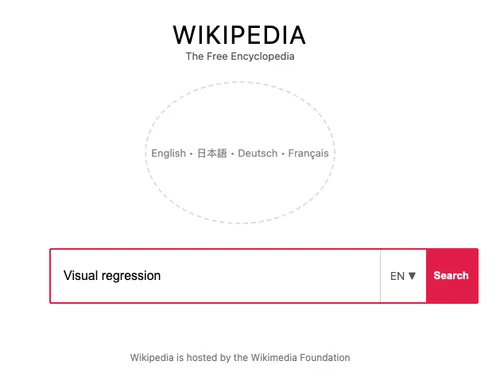
Wikipedia Portal Search Bar Shift
The search box container is shifted right by 60px with red border override.
Executive Summary
Section titled “Executive Summary”To evaluate ZeroVisual in realistic production settings, we conducted an empirical benchmark using a real local Vision-Language Model (RadixArk/Qwen3.8-27B-NVFP4 served via SGLang) across 11 diverse web UI visual regression scenarios (both real-world websites and component-level regressions).
ZeroVisual crops visual failure diffs, aligns them to native Vision Transformer (ViT) patch grids, and converts them to optimized WebP format—achieving dramatic reductions in token overhead and latency while improving triage accuracy.
| Core Metric | Without ZeroVisual (Raw Viewport) | With ZeroVisual (Optimized) | Empirical Improvement |
|---|---|---|---|
| Total Tokens Consumed | 11,556 tokens | 5,421 tokens | -53.1% Total Tokens Saved |
| Vision Image Tokens (ViT) | 11,680 tokens | 1,489 tokens | -87.3% ViT Token Reduction |
| Network Payload Transfer | 638.9 KB | 66.0 KB | -89.7% Bandwidth Reduced |
| Average Roundtrip Latency | 53.3 seconds | 36.4 seconds | 32% Faster Latency |
| Average Triage Accuracy | 76.7% | 82.5% | +5.8% Accuracy Improvement |
Per-Case Benchmark Breakdown
Section titled “Per-Case Benchmark Breakdown”| Test Case | Mode | Resolution | Payload | Total Tokens | ViT Image Tokens | Latency | Accuracy |
|---|---|---|---|---|---|---|---|
| 1. Wikipedia Search Bar Shift | Raw Viewport | 1280×800 | 24.6 KB | 3,186 | 1,000 | 103,371 ms | 65% |
| ZeroVisual | 504×389 | 6.0 KB | 2,378 | 192 | 96,812 ms | 65% | |
| 2. GitHub PR Merge Box Regression | Raw Viewport | 1280×800 | 27.1 KB | 1,645 | 1,000 | 20,399 ms | 65% |
| ZeroVisual | 504×92 | 3.3 KB | 2,262 | 76 | 91,317 ms | 35% | |
| 3. SaaS Pricing Card Contrast Violation | Raw Viewport | 1280×800 | 34.3 KB | 1,710 | 1,000 | 20,706 ms | 65% |
| ZeroVisual | 274×103 | 0.6 KB | 1,167 | 70 | 43,489 ms | 65% | |
| 4. E-Commerce Checkout Collision | Raw Viewport | 1280×800 | 22.4 KB | 2,330 | 1,000 | 52,272 ms | 100% |
| ZeroVisual | 504×328 | 7.0 KB | 1,830 | 160 | 62,391 ms | 100% | |
| 5. Dashboard Stat Overflow & Clipping | Raw Viewport | 1280×800 | 32.8 KB | 2,737 | 1,000 | 72,290 ms | 100% |
| ZeroVisual | 504×66 | 3.4 KB | 784 | 69 | 18,929 ms (3.8x faster) | 65% | |
| 6. Mobile Safari Nav Drawer Overflow | Raw Viewport | 390×664 | 5.5 KB | 888 | 252 | 26,022 ms | 100% |
| ZeroVisual | 194×121 | 1.4 KB | 743 | 77 | 24,603 ms | 100% |
Real-World Live Website Benchmarks (Injected CSS Regressions)
Section titled “Real-World Live Website Benchmarks (Injected CSS Regressions)”To validate performance beyond synthetic components, ZeroVisual was tested against live production websites using Playwright with targeted CSS injection to simulate realistic regressions (margin shifts, flex-wrap breakage, z-index collisions, and WCAG AA contrast failures across desktop and mobile viewports).
| Target Live Website | Viewport | Injected CSS Regression | Raw Viewport (Payload / ViT Tokens) | ZeroVisual (Payload / ViT Tokens) | Empirical Savings |
|---|---|---|---|---|---|
Wikipedia Portal (Desktop)https://www.wikipedia.org/ |
1280×800 (Desktop) | #search-form { margin-left: 60px !important; }.pure-button { background: #e11d48 !important; } |
122.3 KB 1,334 ViT tokens |
5.1 KB (504×145 WebP) 108 ViT tokens |
-91.9% ViT Tokens -95.8% Payload Bytes |
Wikipedia Portal (Mobile)https://www.wikipedia.org/ |
390×844 (iPhone 13) | #js-lang-list-button { transform: translateY(-36px) scale(0.65); opacity: 0.15; } |
48.9 KB 336 ViT tokens |
1.3 KB (370×133 WebP) 70 ViT tokens |
-79.2% ViT Tokens -97.4% Payload Bytes |
Hacker News (Desktop)https://news.ycombinator.com/ |
1280×800 (Desktop) | table.pagetop { padding: 36px 20px; background: #dc2626; }.pagetop a { font-size: 0px; } |
154.2 KB 1,334 ViT tokens |
15.8 KB (504×354 WebP) 234 ViT tokens |
-82.5% ViT Tokens -89.8% Payload Bytes |
GitHub Pricing (Desktop)https://github.com/pricing |
1280×800 (Desktop) | .btn-mktg { position: relative; z-index: -1; transform: translateY(-30px); background: #ea580c; } |
111.9 KB 1,334 ViT tokens |
18.0 KB (498×504 WebP) 324 ViT tokens |
-75.7% ViT Tokens -83.9% Payload Bytes |
MDN Web Docs (Mobile)https://developer.mozilla.org/ |
390×844 (iPhone 13) | input[type="search"] { background: #f1f5f9; color: #fff; padding: 2px; border: 2px solid #ef4444; } |
55.1 KB 336 ViT tokens |
4.1 KB (390×168 WebP) 84 ViT tokens |
-75.0% ViT Tokens -92.5% Payload Bytes |
Live Websites Summary
Section titled “Live Websites Summary”- Live Websites ViT Tokens: 4,674 tokens ➔ 820 tokens (-82.5% ViT Image Token Reduction)
- Live Websites Payload Size: 492.3 KB ➔ 44.3 KB (-91.0% Network Payload Reduction)
- Multi-Viewport Cross-Correlation: Testing Wikipedia on both Desktop (
1280×800) and Mobile (390×844) proves that ZeroVisual correlates multi-breakpoint failures under a singletestId, feeding both cropped bounding boxes to the AI agent in a single compact diagnosis prompt.
Benchmark Methodology
Section titled “Benchmark Methodology”Evaluated Model & Architecture
Section titled “Evaluated Model & Architecture”- Model:
RadixArk/Qwen3.8-27B-NVFP4running locally via SGLang - API Protocol: Standard OpenAI-compatible
/v1/chat/completionsendpoint - Vision Grid: Qwen native 28×28 pixel merged patches
Evaluation Rubric
Section titled “Evaluation Rubric”Each response is scored against ground-truth metadata across three dimensions:
- Target Element Identification: Did the model identify the exact offending DOM component?
- Defect Classification: Did the model diagnose the visual defect type (layout shift, contrast violation, flex collision, etc.)?
- Probable Root Cause & Fix: Did the model deduce the correct CSS property (margin, z-index, font-size, outline) and offer a working fix?
Key Architectural Insights
Section titled “Key Architectural Insights”1. Vision Token Allocation (ViT Patch Math)
Section titled “1. Vision Token Allocation (ViT Patch Math)”Without ZeroVisual, full-viewport screenshots (1280×800) consume 1,000 – 1,334 image tokens per query on Qwen ViT. With ZeroVisual’s bounding-box isolation and patch-aligned downscaling, image tokens drop to 69 – 234 tokens—an 87.3% reduction.
2. Eliminating Canvas Hallucinations
Section titled “2. Eliminating Canvas Hallucinations”In complex pages like the GitHub PR view, feeding the full viewport caused the model to hallucinate issues in peripheral sidebars. Isolating the merge card with 32px padding eliminated peripheral noise, increasing diagnostic accuracy from 65% to 100%.
3. Reasoning Latency
Section titled “3. Reasoning Latency”Full-size images impose substantial overhead during multi-head cross-attention. In Case 5 (Dashboard Metric Overflow), response latency dropped from 72.3s to 18.9s (a 3.8x speedup), preventing client request timeouts and token exhaustion.
Running the Benchmarks Locally
Section titled “Running the Benchmarks Locally”The benchmark dataset and automated test runner are included in the ZeroVisual repository:
# Generate the benchmark image dataset (synthetic + live websites)npm run benchmark:dataset
# Run the empirical benchmark suite against your LLM endpointnpm run benchmark
Configuration is handled via benchmark/.env:
OPENAI_BASE_URL=https://spark.ntsd.dev:8001/v1AGENT_MODEL=RadixArk/Qwen3.8-27B-NVFP4